
Disputes (Chargebacks)
Payments → Disputes is where you manage chargebacks: cardholder-initiated reversals of payments you processed. The Dashboard groups all activity by ARN (Acquirer Reference Number), tracks each case through its lifecycle, and lets you respond — accept the loss, contest with evidence, or escalate to arbitration.
Requires: view chargebacks to see the page; create chargeback event to submit responses; download chargeback evidence to download files.
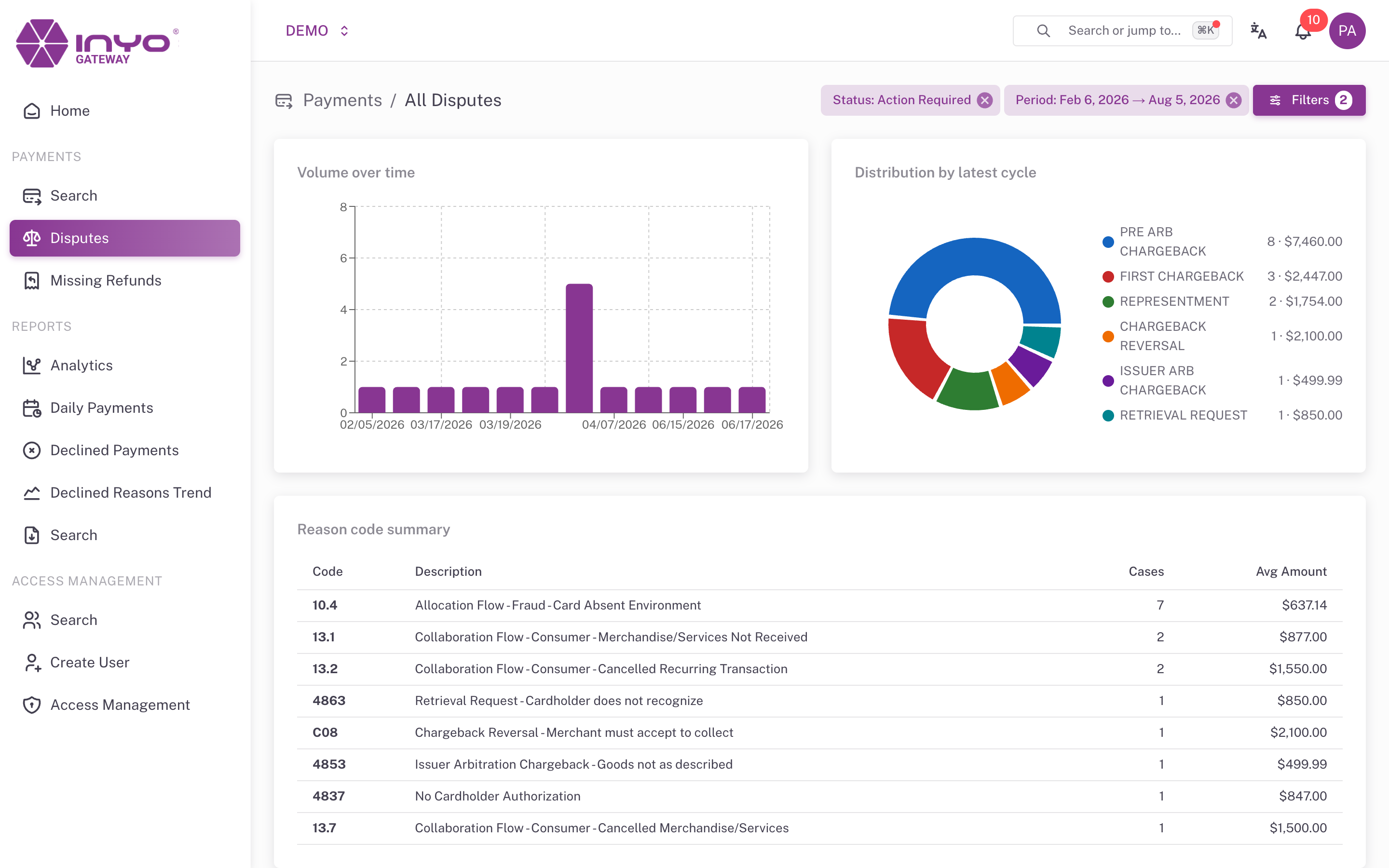
The Disputes List
The list page opens with three summary widgets — Volume over time, Distribution by latest cycle, and a Reason code summary (code, description, case count, average amount) — followed by the Chargeback Details table:
ARN · Cases · Merchant · Agent · Status · Latest Cycle · Reason · Total CB · Card · Date Issued · Reply By · Customer · Phone · Actions
Expanding a row reveals Transaction Details, Customer & Card, Risk Signals (IP address and country, device, fingerprint, visitor ID), and the ARN Timeline across all of that ARN's cases.
Filters: ARN, External ID, Status, Cycle, Reason code, and Period (date received).
Reply By is the deadline that matters. Sort your queue by it — a dispute without a response by that date is typically lost by default.
The Dispute Lifecycle
| Stage | Meaning |
|---|---|
| Pre-Chargeback | Early notification — often resolvable by refunding before it becomes a chargeback |
| First Chargeback | The formal dispute; you respond by accepting or contesting |
| Second Chargeback | The issuer rejected your defense and re-presented the dispute |
| Arbitration | The card network decides — a non-refundable fee applies |
Statuses along the way: Open, Pending Response, Accepted, Disputed, Won, Lost, Arbitration Pending, Arbitration Won, Arbitration Lost, Closed — plus transient badges Processing, Under review, and Awaiting submission. Actions that are not valid at the current stage appear disabled with an explanatory tooltip.
Responding to a Dispute
Open a dispute to see its full detail and the response actions:
| Action | What it does |
|---|---|
| Accept | Accept the chargeback and absorb the loss |
| Dispute | Contest the chargeback with supporting evidence |
| Request Arbitration | Escalate to card network arbitration — you must tick a checkbox accepting the non-refundable arbitration fee |
| Retry | Resubmit a response that failed to deliver |
Every response dialog asks for a Description (required), an optional Call Number, and a confirmation checkbox.
Disputing requires evidence. The Dispute dialog adds:
- Evidence Type —
Receipt / Invoice,Delivery Proof,Customer Communication,Refund Policy / Terms, orOther Documentation - Evidence Description — what the files demonstrate
- File upload (drag-and-drop) — images, PDF, DOC/DOCX, XLS/XLSX, with per-file, total-size, and file-count limits shown in the dialog. At least one file is required.
What wins disputes: match the evidence to the reason code. Fraud reason codes want proof the cardholder participated (AVS/CVC matches, IP and device signals from the Risk Signals panel, delivery to the verified address). Product/service codes want delivery proof and customer communication. Duplicate/credit codes want your transaction records showing the refund or the distinct orders.
Action History and Reviewer Feedback
Each dispute's Action History timeline tracks your submissions (Not submitted → Submitted) and the review status (Pending → Reviewed). When a reviewer needs more information, their comments appear on the interaction and Add New Evidence lets you attach a follow-up response. Previously submitted files can be retrieved with Download evidences (permission-gated).
You are notified of new chargeback events and submission confirmations via the Notifications bell, which deep-links straight into the dispute.
Reducing Chargebacks
The best dispute is the one that never opens: respond to pre-chargebacks with a refund when the transaction looks unrecoverable, and see Mitigating Fraud for prevention practices.